

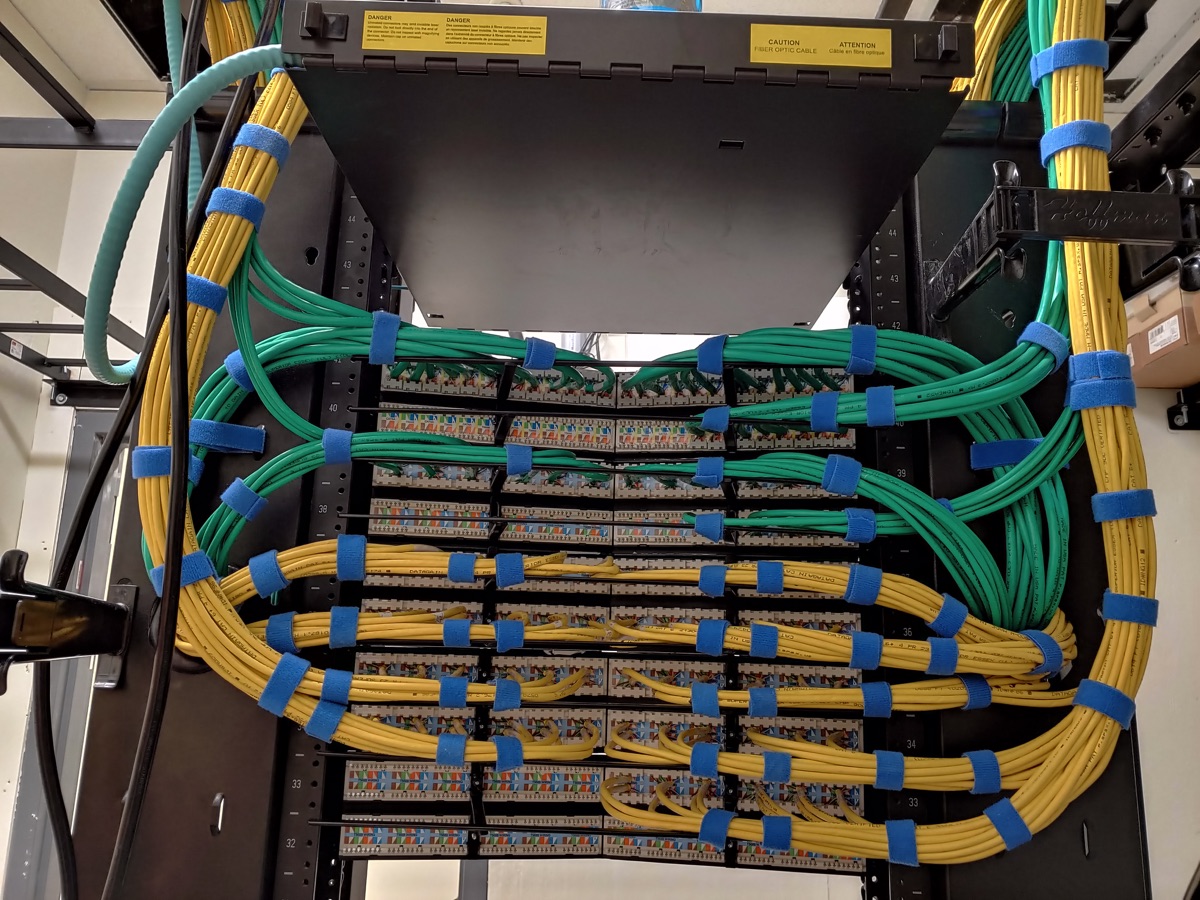
Service scope
In one real commercial project, Unified Low Voltage Solutions turned freely hanging wire into a neatly terminated server rack in two days. Rack work can be combined with office wiring, fiber, wireless access points and troubleshooting.
What Unified Low Voltage Solutions provides
- Custom server rack installation
- Commercial server-closet termination
- Home media closets
- Cable clean-up services
- Office and commercial wiring
- Fiber and wireless access point infrastructure
Plan the rack around the equipment
Start with a list of the equipment the rack must hold and the cables that need to reach it. Identify the network location, the available space and the direction from which existing cables arrive. A rack installation can include cable clean-up, terminations and supporting office wiring. Agree on those tasks before choosing the final layout.
Check access to the front and rear of the planned equipment position. Include patch panels, network equipment and any existing components you want to retain in the discussion. The layout should show where each cable ends and which connections need to remain accessible for service. Ask how the rack location fits the room before adding equipment to an already crowded closet.
Commercial closets and home media racks
A business rack project needs a contact who can identify active connections and authorize any interruption. Match the plan to desk locations, cameras and wireless access points. If the office will stay occupied, agree on the work sequence and the connections that must remain available. Keep the equipment list and the drop list together during planning.
At home, a media closet can bring network and entertainment connections into one location. Identify which rooms feed back to the closet and how the equipment will be reached after installation. Speaker wiring, home theater equipment and whole-home audio may need their own connection plan. Include those requirements before approving the rack scope.
Review the cabling specification
A rack can contain cables with different jobs. Cat5e may serve existing compatible devices. Cat6 is a common choice to discuss for new home or office runs, and Cat6A may be needed for a specified network design. Cat8 serves specialized short equipment links. Cat7 also appears on the installation list; confirm the equipment and connector requirements before specifying it.
Match the selected cable to the jacks, panels and patch cords used in the connection. Fiber work can be scoped with rack installation when the project needs it. Keep fiber and copper endpoints identified on the layout. Choosing a rack does not settle the cable specification, pathway or testing requirements; include each in the written scope.
From room inspection to labeled connections
- Site walk. Review the room, rack position, existing cable entry and service access. Identify equipment that must stay connected.
- Layout and drop plan. List the equipment and map cable destinations to panel positions. Agree on any replacement cabling or pathway work.
- Installation and clean-up. Install the specified rack and complete the agreed terminations. Confirm the purpose of existing cables before disconnecting them.
- Testing. Define the connection checks and any cable certification reports required by the project. Include those requirements before scheduling the work.
- Labeling and handover. Match patch-panel labels to outlet locations and retain the layout. Record the connections that remain reserved for later use.
Keep the layout usable as equipment changes
Save the panel map and update it when a connection moves. Before adding a switch, camera or access point, identify the cable path and the equipment space it needs. Cable clean-up should begin with a review of active connections. A tidy bundle alone does not tell you where a cable ends or whether it still serves a device.
Network troubleshooting is available alongside custom rack work. When requesting help, describe the affected room or device and the connection label if one exists. Photos of the current rack and cable entry can help explain the scope. Keep changes to the rack and changes to the room's pathways on the same project list.
Define the quote boundaries
Rack equipment, existing cable condition, termination work, access and any new routes affect the quote. Identify whether the project includes installation, cable clean-up, new drops or a broader room buildout. Every job is quoted individually. Request the equipment list, tests, labels and any agreed connection interruptions in writing.
Questions about custom server racks
Can Unified Low Voltage Solutions terminate a commercial server rack?
Yes. Unified Low Voltage Solutions provides custom server rack installation and completed a published commercial termination project in two days.
Do you clean up existing rack cabling?
Yes. Cable clean-up services are part of the rack work.
Can rack work include a home media closet?
Yes. The rack service covers home media closets as well as commercial racks. Describe the equipment, room connections and access available at the proposed location.
What should be on a rack installation plan?
List the equipment, cable destinations, patch-panel positions and existing connections that must stay active. Include access to the equipment and any supporting pathway work.
Does rack installation include cable certification?
Agree on connection checks and any required cable certification reports in the written quote. Include the test requirements before the rack work is scheduled.
What affects the price of rack work?
Equipment, existing cable condition, terminations, access, new drops and room work affect the scope. Every project is quoted individually. Request the equipment list and work boundaries in writing.